
The best computer to buy in 2026 depends on what you need it to do. A laptop for school, a desktop for a home office, and a system for demanding creative work solve different problems. Start with your software, your workspace, and your budget before comparing processor names.
This shortlist is based on manufacturer specifications and product information available in October 2026. These are options we would compare for particular needs, not the results of our own hands-on performance tests.
Best computers to buy in 2026: a quick shortlist
- Everyday Mac laptop: Apple MacBook Air with M5.
- Premium portable Windows option: Dell XPS 14 (2026).
- Business-focused Windows option: Lenovo ThinkPad T14 Gen 7.
- Lower-cost everyday option to compare: Acer Aspire Go 15.
- Compact Mac desktop: Apple Mac mini with M6.
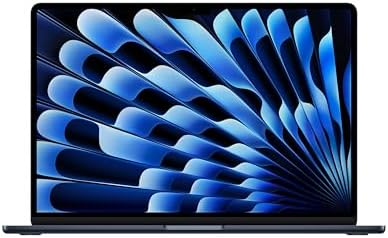
- BUILT FOR COLLEGE. AND BEYOND — MacBook Air with the M5 chip packs blazing speed and powerful AI capabilities into an in…
- TEAR THROUGH TOUGH ASSIGNMENTS — With its faster CPU and unified memory, the M5 chip delivers even more performance and …
- MAKE QUICK WORK OF YOUR TO-DO LIST — Apple Intelligence helps you write, express yourself, and get things done effortles…
Apple MacBook Air with M5: for everyday portable computing
The M5 MacBook Air belongs on the shortlist for people who want macOS in a portable computer. Apple offers 13-inch and 15-inch versions, giving you a choice between a smaller bag-friendly machine and more screen space.
We would consider it for writing, studying, browsing, and office work. Before choosing a configuration, check the requirements of your actual applications and how much memory and storage you will need. Confirm that any specialist software, games, or accessories you rely on work with macOS.
It is a sensible starting point for Mac shoppers, but heavier creative workloads deserve a comparison with a MacBook Pro. Do not assume every workload needs the more expensive machine.
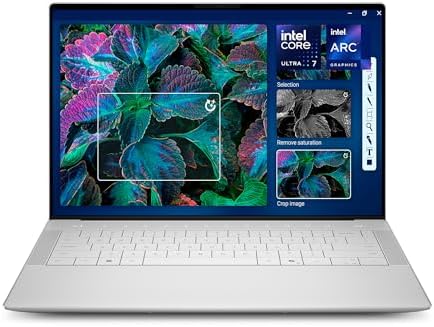
- Powerful Creation: Run creative apps smoother and faster with powerful Intel Core Ultra processors with a dedicated engi…
- Variable Refresh Rate: Moving content is smoother with up to 120Hz variable refresh rate, which also improves battery li…
- Sleek, Modern Design: Crafted with machined aluminum and Gorilla Glass 3 to deliver a strong, lightweight laptop.
Dell XPS 14 (2026): for a premium Windows laptop
The 2026 XPS 14, model DA14260, is worth comparing if you want a compact Windows laptop. Dell lists multiple processor, memory, storage, and display configurations. The exact version matters: a shared model name does not mean two listings offer the same hardware.
Compare the screen as carefully as the processor. Dell lists both non-touch and higher-resolution touch options. Decide whether the display upgrade helps your work, then check ports, docking needs, and the total cost of your chosen configuration.
For gaming or GPU-heavy creative software, check application requirements and independent benchmarks before buying. A premium laptop label does not automatically make a system the right gaming computer.

- Release Month: May
- Release Year: 2026
- AI-powered: Yes
Lenovo ThinkPad T14 Gen 7: for a work-focused setup
The ThinkPad T14 Gen 7 is another option for buyers who primarily need a Windows work computer. Lenovo offers Intel and AMD versions, so compare the complete specification rather than stopping at the T14 name.
For business use, look at the operating-system edition, warranty, available ports, webcam, and compatibility with your office dock. If repairability or future upgrades matter, check the service documentation for the exact model before ordering.

- PERFORMANCE: The Lenovo ThinkPad E14 Gen 7 features the AMD Ryzen 7 250 processor built for business professionals, stud…
- MEMORY: 16GB RAM DDR5, STORAGE: 512GB SSD PCIe, Backlit spill-resistant keyboard, multimedia Fn keys, WiFi 6E + Bluetoot…
- IMMERSIVE DISPLAY: 14″ Display Full HD+ (1920×1200) IPS Non-Touch 300 nits, low blue light certification for a comfortab…

- [Superior Display] 15.6″ IPS FHD (1920×1080) 60Hz Display; WIFI 6 MT7921, Bluetooth 5.3, RJ-45, Webcam, Backlit KB Stand…
- [Perfect Views] IPS displays offer wider viewing angles, better color reproduction, & faster response times than TN disp…
- [Powerful Performance] Zen 3 Gen AMD Ryzen 7 5825U 2.00GHz Processor (upto 4.5 GHz, 16MB Cache, 8-Cores, 16-Threads, ); …
Acer Aspire Go 15: for straightforward everyday tasks
The Aspire Go 15 is worth checking when keeping the purchase cost down is a priority. For example, Acer lists the AG15-72P-78JR with 16GB of memory and a 512GB SSD. Other Aspire Go models have different specifications.
We would compare it for browsing, documents, email, and general home use. Check the screen, keyboard features, processor, and memory arrangement on the specific listing. A lower purchase price is helpful only if the computer comfortably handles your routine.

- LITTLE DO-IT-ALL — Mac mini packs pure power into a small, five-by-five-inch desktop as the M6 chip delivers next-level …
- M6 CHIP — Everything you do on Mac mini feels more responsive with the M6 chip and its next-generation CPU. Fly through …
- CONNECT IT ALL — Features three Thunderbolt 4 ports, an HDMI port, and a 2.5Gb Ethernet port in the back, and two USB-C …
Apple Mac mini with M6: for a compact desktop
If your computer stays on a desk, the M6 Mac mini is an option to compare. Apple also offers an M5 Pro version for buyers whose workloads justify the additional capability.
Budget for the whole setup, including a monitor, keyboard, mouse, and any adapters you need. A small desktop can make sense if you already own those accessories, but it does not replace the convenience of a laptop for travel.
What should you check before buying the Best Computers to Buy in 2026?
As a practical starting point, we would compare configurations with 16GB of memory and a 512GB SSD for general multitasking. That is a buying guideline, not a requirement for every user. Larger creative projects, virtual machines, or demanding development tools may justify more.
Check software compatibility first, especially when moving between Windows and macOS or between different processor architectures. Then compare warranty coverage, return terms, storage space, and the cost of accessories.
Our advice is to choose the computer that fits your daily work and leaves room for your likely future needs. Check the retailer’s current configuration and availability before ordering.
Browse our computer and electronics listings, learn more about BestFindz, and read our affiliate disclosure.